Key takeaways
Overview: Upwork Boosted Proposals: Are They Worth It? (A Data-Backed Answer) — Learn when to boost, when to skip, and how to calculate your ROI before you bid. | Key topics: What Are Upwork Boosted Proposals?; How Much Does Boosting Cost?; The ROI Math: When Boosting Makes Sense | Core insight: When you submit a proposal on Upwork, you can spend extra Connects to "boost" your bid, which places your proposal in the top four positions visible to the client when they open their job post. | Action or implication: The core question is simple: does the incremental visibility from boosting translate into a higher probability of winning contracts that are worth more than the boost cost?
Short answer
For upwork boosted proposals: are they worth it?, focus on fit before volume. A strong Upwork application shows that you understood the client’s specific problem, gives one relevant proof point, and makes the next step easy. Connects and boosting can increase the cost or visibility of an application, but they do not replace relevance. Use client history, scope, budget, and competition signals to decide whether the opportunity deserves a tailored proposal.
Key takeaways
Prioritize strong job–profile fit before writing.
Open with the client’s problem, not a generic introduction.
Use one concrete, relevant proof point.
Treat Connects and boosting as allocation decisions, not substitutes for fit.
Every freelancer on Upwork has faced the same dilemma. You find a job that's a perfect fit — your experience matches, the budget is right, the client looks serious. Then you see the option to boost your proposal and land in the top four spots at the top of the client's list. You hover over the button. Is it worth spending the extra Connects?
The answer, frustratingly, is: it depends. But it depends on very specific, calculable factors — and once you understand those factors, you can make a clear-headed decision every time instead of guessing.
This article breaks down exactly how Upwork Boosted Proposals work, when the math favors boosting, and the most common mistakes freelancers make that turn boosting into wasted money.
What Are Upwork Boosted Proposals?
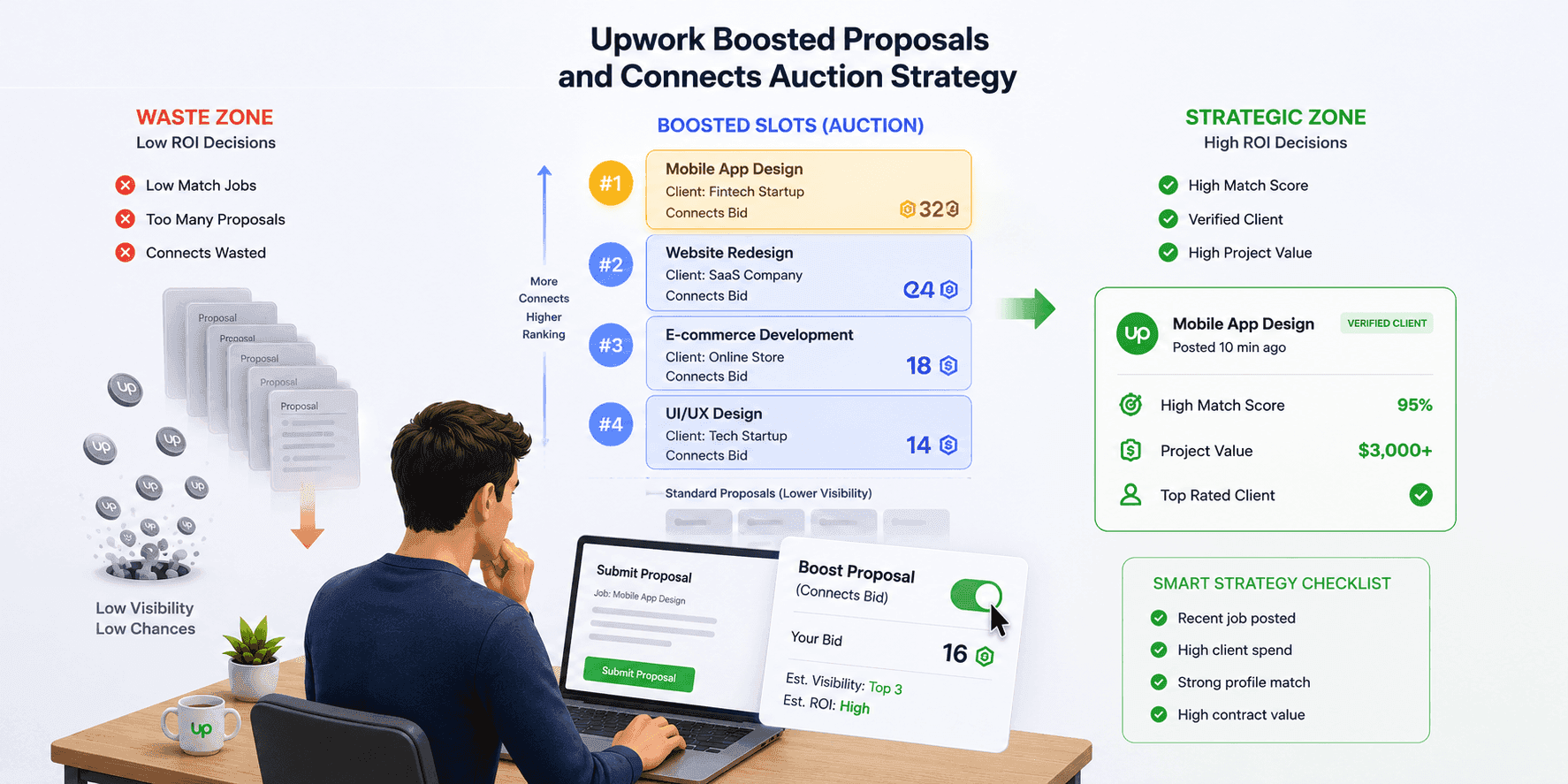
When you submit a proposal on Upwork, you can spend extra Connects to "boost" your bid, which places your proposal in the top four positions visible to the client when they open their job post. The top four slots are labeled as boosted — clients can see that these proposals paid for the position — but being at the top of the list significantly increases the chance your proposal gets read.
The boost operates like an auction. You bid a number of extra Connects, and the top four bidders get the top four slots. If you don't bid enough to crack the top four, you pay nothing extra — your proposal still goes in as a standard submission.
How Much Does Boosting Cost?
In 2026, Connects cost $0.15 each. A standard proposal requires 6 to 16 Connects depending on the job, meaning a base submission costs $0.90 to $2.40 before any boost.
Boosting adds more Connects on top. On a competitive job, landing in the top four might require 25 to 40 total Connects — so $3.75 to $6.00 per boosted proposal, including the base cost.
That might sound modest. But if you're submitting 20 proposals a week and boosting half of them, you're spending $40–60/month on Connects alone. That's not necessarily bad — but it should be a deliberate investment, not a reflexive habit.
The ROI Math: When Boosting Makes Sense
The core question is simple: does the incremental visibility from boosting translate into a higher probability of winning contracts that are worth more than the boost cost?
Here's a basic framework:
If you spend 20 extra Connects ($3.00) to boost a proposal on a $200 fixed-price job, you need that boost to meaningfully increase your win rate for it to pay off. At a 10% base win rate, you'd win 1 in 10 proposals, spending $30 in boost Connects to win one $200 job. The math is marginal.
If you spend 20 extra Connects ($3.00) to boost a proposal on a $3,000 project, the calculus changes dramatically. Even if boosting only modestly improves your odds, the contract value makes the investment clearly rational.
The rule of thumb that experienced freelancers use: only boost on jobs where the expected contract value is at least 100x the cost of the boost. So if a boost costs $3.00, the project should be worth at least $300. On a $3,000 project, a $3 boost is trivially easy to justify.
Five Factors That Make Boosting Worth It
Not every high-value job is worth boosting. Use these criteria to filter:
1. The Job Was Posted Recently
The ideal boost target is a job posted within the last 24 hours, ideally fewer than 5 hours old. The proposal pool is still small, bidding competition is low, and the client is actively engaged with their post. A great booth on a 3-day-old job post with 40 proposals is far less valuable than a modest boost on a fresh post with 5 proposals.
2. Your Profile Is a Strong Match
Boosting gets you seen — it doesn't make a weak proposal win. If your profile, portfolio, and skills are a close match for the job requirements, boosting amplifies an already-competitive application. If they're a poor match, you're paying to be rejected faster.
Ask yourself honestly: if a client saw my profile and proposal without the boost, would they still be interested? If the answer is no, save your Connects.
3. The Job Has a Verified Client with Meaningful Spend History
Boosting on speculative or low-quality job posts is a waste. Before boosting, check the client's profile: How much have they spent on Upwork historically? Do they have positive freelancer reviews? Is their payment method verified? A client who has spent $50,000 on the platform and has 4.9-star reviews is worth boosting for. An account with $0 spent and no reviews is not.
4. The Contract Value Justifies the Cost
As covered above, the contract value matters. For hourly jobs, estimate the likely contract value: hourly rate × expected hours. A $75/hour job that looks like a 3-month part-time engagement could be worth $15,000+. A boost that costs $4 is trivially small against that potential.
5. The Category Is Competitive
Boosting matters most in categories where proposals pile up quickly — web development, copywriting, design, and marketing tend to get flooded. In highly specialized niches where fewer freelancers apply, you may naturally appear near the top of the proposal list without boosting at all. Understand the typical competition level in your category before defaulting to boosting.
When NOT to Boost
Vague or Under-Budget Job Posts
Job posts that are poorly written, have no clear budget, or list unrealistically low budgets attract questionable clients. Boosting to reach the top of a bad opportunity is counterproductive.
Jobs Where You'd Be Stretching Your Skills
If you're applying to a job that's slightly outside your core expertise hoping to learn on the job, don't boost it. Invest your Connects in strong-fit opportunities where you can write a compelling, confident proposal.
Every Single Proposal
Some freelancers reflexively boost every submission. This is an expensive habit that doesn't necessarily improve outcomes — it just increases your Connects spend. Selective boosting based on the criteria above is more effective than blanket boosting.
Jobs Already Flooded with Proposals
If a job has 50+ proposals and has been up for several days, the client has likely already identified candidates they're interested in. A boost won't change the fundamental dynamic that your proposal will be one of dozens the client needs to scroll through.
A Simple Decision Framework
Before boosting, run through this quick checklist:
Job posted within the last 24 hours?
Fewer than 15 proposals already submitted?
Client has $1,000+ historical Upwork spend and verified payment?
Contract value is at least 100x the boost cost?
My profile is a strong match for the job requirements?
I can write a genuinely compelling, tailored proposal?
If you check all six boxes, boost. If you miss two or more, submit a standard proposal or skip the job.
How to Track Whether Boosting Is Working for You
The only way to know if your boosting strategy is effective is to track it. Keep a simple spreadsheet (or use a note in your preferred app) with:
Date of proposal
Job type and estimated value
Boosted? (Yes/No)
Connects spent
Outcome (no response / interview / contract won)
After 30–60 proposals, you'll have enough data to see your personal win rates on boosted vs. unboosted proposals and whether the math favors continuing to boost.
Everyone's data will look different. Freelancers in high-competition categories with strong profiles may see significant lift from boosting. Freelancers in specialized niches with few competitors may find that boosting adds little above their baseline win rate.
What Boosting Can't Fix
It's worth being direct about the limitations. A boosted proposal that is generic, poorly written, or mismatched to what the client is looking for will still lose — it'll just lose more visibly, having paid for the privilege of being read first.
Boosting is a visibility tool. It changes where you appear in the client's proposal list; it doesn't change the quality of your proposal or the strength of your profile. Before spending extra Connects to boost, make sure you've invested the time to write a proposal that actually addresses the client's specific problem, references your relevant experience concisely, and ends with a clear next step.
The freelancers who get the best ROI from boosting are the ones who only boost when they've already written their best proposal for a well-matched job. The boost just makes sure the client actually sees it.
Boosted Proposals and Your Overall Connects Budget
Upwork's Freelancer Plus plan includes 80 Connects/month for $20. If you're boosting selectively on high-value jobs, that monthly allocation may be sufficient. If you're boosting frequently or applying to high-Connect-cost jobs, you may need to purchase additional Connects.
Before buying more Connects, audit your recent proposals. Are you submitting to the right types of jobs? Are you tracking your win rates? More Connects are only useful if your proposal strategy is already solid.
FAQ: Upwork Boosted Proposals
Will clients know I boosted my proposal?
Yes. Boosted proposals are labeled in the client's view. However, clients understand boosting as a signal of confidence and interest in the job — it's not generally perceived negatively.
Does boosting guarantee a top-4 position?
No. Boosting is an auction. If four other freelancers bid more Connects than you, they'll take the top four slots and you won't pay any extra Connects (your proposal goes in as a standard submission). You're only charged the boost cost if you actually secure a top-4 position.
Can I boost a proposal after I've submitted it?
Yes. You can add a boost to a previously submitted proposal, though the earlier you boost, the better — early proposals tend to get more attention from clients who engage quickly with fresh posts.
Do boosted proposals expire?
Your proposal stays live (boosted or otherwise) until the client closes the job or you withdraw. However, client engagement tends to drop significantly after the first 24–48 hours of a job being posted.
Is boosting more important for new freelancers?
Not necessarily. New freelancers often benefit more from improving their profile and proposal quality before investing heavily in boosting. Top Rated freelancers with strong work history may see better ROI from boosting because they have the profile to back up the visibility.
Spending your Connects on the wrong jobs is as costly as not boosting the right ones. SmartBid helps freelancers identify the highest-potential job opportunities on Upwork so you can focus your proposals — boosted or otherwise — where they'll actually land.
Sources
support.upwork.com/hc/en-us/articles/4406395531795-How-to-boost-your-proposal
support.upwork.com/hc/en-us/articles/211062998-How-to-submit-a-proposal-on-Upwork